
Behind the Scenes: Editing a Professional Photoshoot
Wed Oct 2026

Category:
A professional photoshoot doesn’t simply finish when the camera is put away.
There is still plenty of work to do before the images are ready to be used. Post-production is where the photographs are sorted, reviewed and edited, with decisions made about how each image should look and where it will ultimately be used.
We don’t believe every photograph needs to be heavily edited or made to look unnatural. Good editing should improve the image without taking away from what was actually captured. The focus is on keeping the results clean, natural and suited to the purpose of the shoot.
But what actually happens once the photos have been taken? What does the post-production and editing process involve?
From camera to final image
Once a shoot is complete, the first stage is to transfer and organise the files. Depending on the assignment, this can mean hundreds of individual photographs.
The original camera files contain considerably more information than a finished JPEG or RAW image. This gives us flexibility when adjusting exposure, colour, contrast and other characteristics during processing.
The workflow generally moves through several stages:
• File organisation and backup
• Image selection and culling
• Exposure and tonal adjustments
• Colour correction and grading
• Detailed retouching where required
• Final quality control
• Exporting and delivery
Each stage has a specific purpose. Planned post-production processes are therefore less about applying a preset and more about making informed decisions about each image.
Step 1: Selecting the strongest photographs
The first edit is often the least visible to the client, but one of the most important.
A professional shoot can produce a large number of frames, including test shots, variations, duplicates and images where a subject may have blinked or moved unexpectedly.
The selection process reduces this collection to the photographs that best represent the brief.
For a portrait photography session, this might mean looking at expression, posture, eye contact, lighting and composition. For a commercial shoot, we may also consider whether the image communicates the intended message and works within the client’s broader visual identity.
The goal is not simply to provide more photographs. It is to provide a selection of the right photographs.
Step 2: Establishing a consistent look
Once the final selection has been made, the images are processed to create consistency across the set.
This is where exposure, white balance, contrast, highlights and shadows are carefully considered.
Colour is particularly important. Skin tones need to remain believable, while backgrounds, clothing and other elements should sit naturally within the frame.
Colour grading versus colour correction
These terms are sometimes used interchangeably, but they serve different purposes.
Colour correction is about getting the image technically and visually balanced. This can include correcting an unwanted colour cast or ensuring skin tones look natural.
Colour grading is more creative. It can be used to establish a particular mood or visual character while maintaining consistency with the overall project.
For example, a corporate portrait may benefit from clean, neutral colour, while an editorial campaign could use a more distinctive treatment.
The important point is that decisions should support the purpose of the photographs rather than become an effect for its own sake.
Step 3: Professional retouching
Retouching is where the finished image normally becomes more refined, but restraint is important.
Professional retouching can include removing temporary blemishes, reducing distractions, cleaning up backgrounds and making subtle adjustments to skin texture. Clothing can also be tidied where appropriate, while small elements within a scene may be removed if they distract from the subject.
The objective is not necessarily to make someone look completely different, which is referred to as over editing.
In many cases, the best retouching is the work you do not immediately notice.
For professional portraits, for example, we want the person to remain recognisable and believable. Excessive smoothing or reshaping can quickly make an image feel artificial.
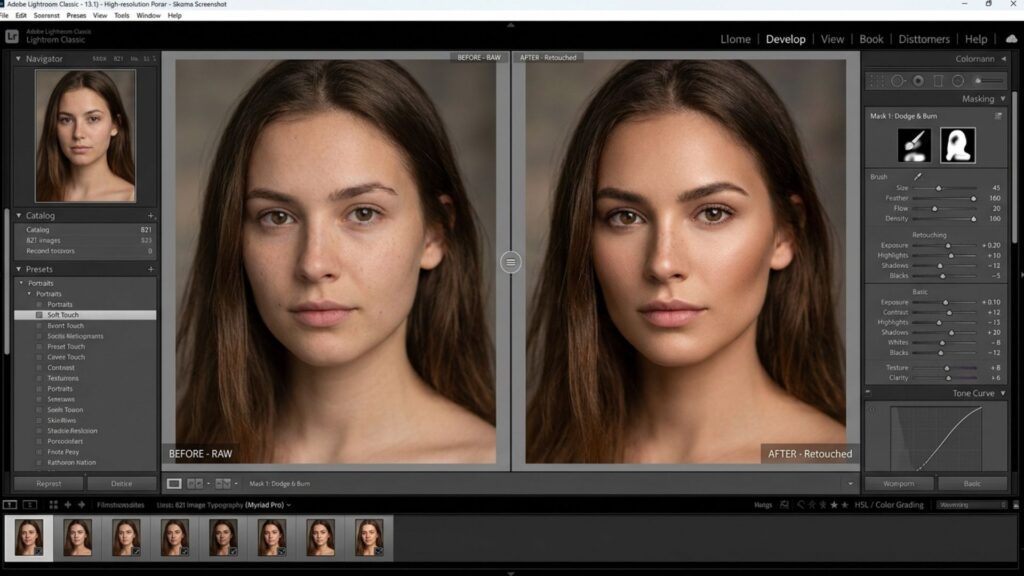
Before and after: what changes?
Original photograph straight from the camera and downloaded from the card, while the
final processed image shows tonal adjustments, colour refinement and subtle retouching.
A useful before-and-after comparison should demonstrate the difference without suggesting that the original photograph was poor. The original file is the foundation. It is professional post-production that builds on that foundation.
Step 4: Working with the original lighting
Good editing starts with good photography.
Lighting decisions made during the shoot have a direct effect on what can be achieved afterwards. Exposure, direction of light, contrast and the relationship between the subject and background all contribute to the final image.
Not even skilled post-shoot editing services can replace every decision made on set.
This is why an experienced photographer considers the eventual editing workflow while shooting. The objective is to create files that contain the information and quality needed for the intended finish.
This also makes the process more efficient. Rather than trying to rescue an image afterwards, we aim to capture it correctly from the beginning.
Step 5: Creating a repeatable workflow
A post-production editing and workflow is not simply about having an eye for an attractive image. It also requires an organised workflow.
Files need to be named, stored and backed up correctly. Images need to remain consistent across a set. Export settings need to match their intended application.
A photograph destined for a website may have different requirements from one being prepared for print, social media or a large-format campaign.
This technical side of the process is easy to overlook because the client generally only sees the finished photographs. However, it is an important part of delivering a reliable professional service.
Why editing should reflect the purpose of the shoot
There is no universal editing style that works for every assignment.
A headshot intended for a company website needs to communicate professionalism and authenticity. An artist portfolio may require a more expressive treatment. Product photography demands accurate colour and careful attention to detail.
A well edited image should therefore begin with the question: What does this photograph need to achieve?
That keeps this process focused on communication rather than simply making an image look more dramatic.
A closer look at the finished result
When reviewing a before-and-after example, look beyond the obvious changes.
Notice the balance of the exposure. Look at skin tone, background colour, contrast and distracting elements. Consider whether the subject remains natural and whether the final image feels consistent with the rest of the set.
These are the small decisions that collectively make a professional image feel polished.

What clients should expect from the editing workflow
Final image preparation should not be a mysterious process.
A client commissioning professional photography should understand that the service involves much more than pressing the shutter. Image selection, file management, colour work, retouching and quality control all form part of the production workflow.
At the same time,the finishing process should never become a substitute for careful photography.
The strongest results come from combining thoughtful planning, controlled lighting, strong composition and experienced post-production.
If you are considering a professional shoot and want to understand how the images will be produced from capture through to delivery, get in touch with dlphoto to discuss your requirements.
Frequently Asked Questions
What is involved in post-shoot editing?
Professional image refinement typically includes selecting the strongest images, correcting exposure and colour, applying an appropriate visual treatment, carrying out retouching where necessary, checking the final files and exporting them in the required format.
How long does photo editing take after a photoshoot?
The time required depends on the number of images, the type of photography and the level of retouching involved. A straightforward portrait session can require considerably less post-production than a commercial campaign with a large number of detailed images.
What is the difference between colour correction and colour grading?
Colour correction focuses on achieving accurate and balanced colour, exposure and white balance. Colour grading is a more creative process used to establish a particular mood or visual character.
Does professional retouching make people look different?
It can, but it should not necessarily do so. Good retouching is often subtle, preserving natural skin texture and recognisable features while removing temporary distractions or refining elements that affect the finished photograph.
Can editing fix a poorly photographed image?
Image processing can improve many aspects of an image, but it cannot reliably compensate for every problem created during capture. Poor focus, severely incorrect exposure, unsuitable lighting or an unsuitable composition can place significant limitations on what can be achieved afterwards.
Why is the original camera file important?
Original camera files contain more image information and provide greater flexibility during processing. They allow the photographer to make more controlled adjustments to exposure, colour and tonal range before producing the final image.
Should every photograph from a professional shoot be heavily edited?
No. The appropriate level of editing depends on the purpose of the image.The retouching workflow should enhance the photograph and support its intended use rather than introduce unnecessary effects.
How can I see examples of professional editing?
Before-and-after comparisons are one of the clearest ways to understand the process. They show how exposure, colour, retouching and other adjustments can refine an image while allowing the original capture to remain visible for comparison.